As organizations increasingly move their workloads to the cloud, managing who has access to what becomes a critical pillar of governance and security. Oracle Cloud Infrastructure (OCI) addresses this need with its powerful Identity and Access Management (IAM) service.
In this post, we’ll explore the fundamentals of OCI IAM, its key components, and how it helps maintain secure, scalable access control in a cloud environment.
What Is OCI IAM?
IAM (Identity and Access Management) is a foundational OCI service that lets you control access to cloud resources. It allows you to define:
Who can access your OCI environment
What actions they can perform
Which resources they can interact with
This access control is implemented through authentication (AuthN) and authorization (AuthZ):
Authentication (AuthN): Verifies the identity of a user or system
Authorization (AuthZ): Determines what actions they are permitted to perform
Core Components of OCI IAM
OCI IAM includes a rich set of features for defining identities and controlling access:
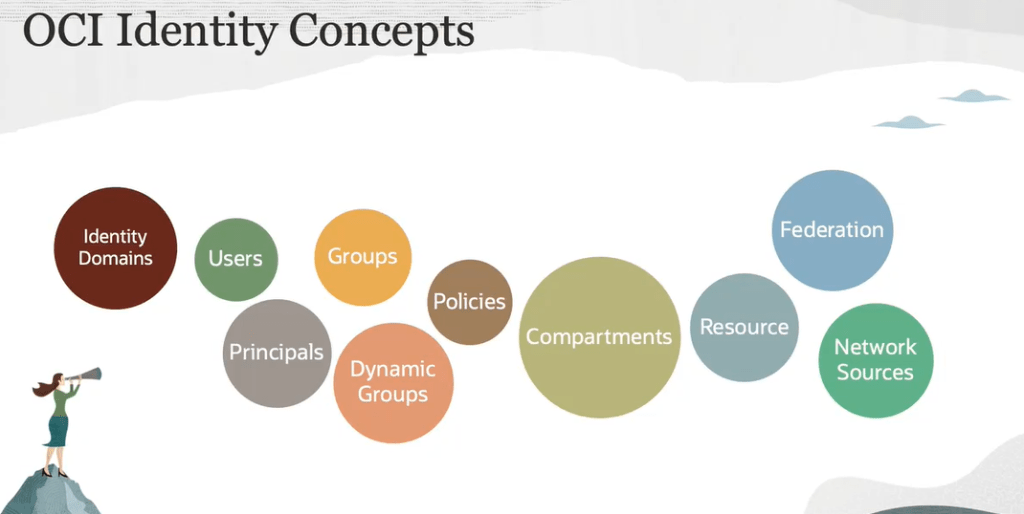
✅ Identity Domains
An identity domain is a logical container for users, groups, and related configurations. It defines the user population and their authentication settings, similar to a directory service.
✅ Users and Principals
Users represent individual human users or system accounts.
Principals can be IAM users or resource principals (services using OCI resources).
✅ Groups and Dynamic Groups
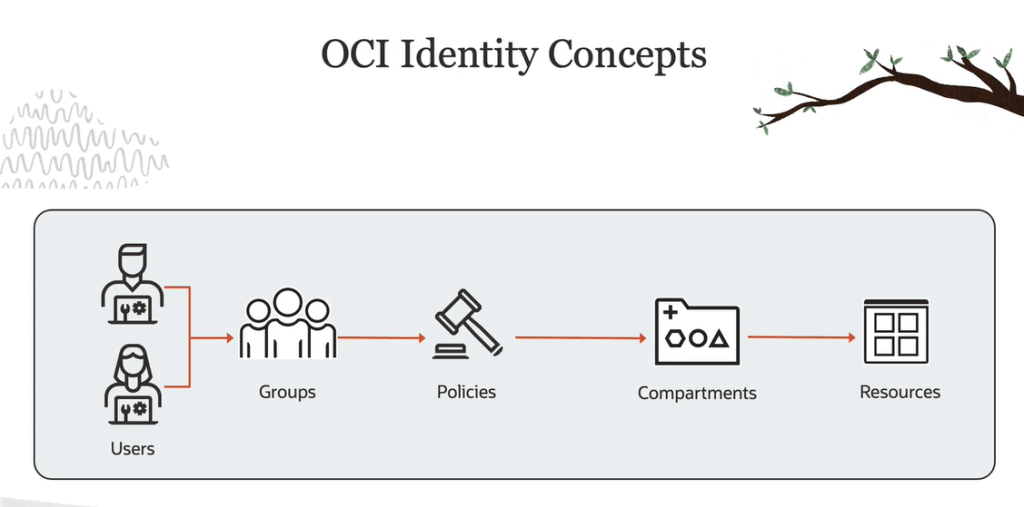
Groups are collections of users who share the same access requirements.
Dynamic Groups are rule-based groupings where membership changes automatically based on defined conditions (e.g., instance OCID, tags, etc.).
✅ Policies
OCI policies are written in a human-readable format and define authorization rules for users and groups. Policies always allow actions—OCI follows a default deny and least privilege model.
✅ Compartments
A compartment is a logical grouping of related cloud resources. When you create an OCI account (tenancy), you get a root compartment. Best practice, however, is to organize resources into dedicated compartments (e.g., for networking, storage, compute) to enhance access control and isolation.
IAM Policy Structure and Syntax
OCI policies follow a clear, modular syntax:
plaintextCopyEditAllow <subject> to <verb> <resource-type> in <location> [where <conditions>]
Subject: Group(s) or dynamic group(s)
Verb: Action type (inspect, read, use, manage)
Resource Type: OCI service (e.g., vcns, volumes, virtual-network-family)
Location: The compartment or tenancy in which the policy applies
Conditions: Optional expressions to enforce contextual constraints (e.g., based on IPs or tags)
⚠️ If you omit the identity domain in the subject, OCI assumes it belongs to the default domain.
Advanced Features and Federation
OCI supports federation with third-party identity providers (IdPs) like Microsoft Entra ID (Azure AD), allowing enterprises to delegate user and group management to external directories while using OCI policies to define access control.
Additionally, Network Sources can be defined as sets of IP addresses or CIDR blocks, and used in policies to allow or restrict access based on network origin.
Best Practices for IAM and Compartments
Use compartments to segment resources logically by department, function, or lifecycle.
Avoid assigning policies directly to users—use groups and dynamic groups instead.
Follow the principle of least privilege by granting only necessary permissions.
Federate identity with enterprise IdPs to centralize user management.
Leverage network-based access control using network sources in advanced policies.
Conclusion
OCI Identity and Access Management is a powerful service that provides fine-grained control over user access and resource authorization. By leveraging its features such as identity domains, dynamic groups, and compartment-based isolation, organizations can enforce security best practices while scaling confidently in the cloud.
Whether you’re just getting started with OCI or looking to refine your access strategy, understanding IAM is essential to building a secure and well-governed cloud environment.
Title: Oracle Multicloud Milestones: OCI Now Integrated with Azure, Google Cloud, and AWS
Oracle has now established strategic partnerships with Microsoft Azure, Google Cloud, and Amazon Web Services (AWS), advancing our commitment to meet customers wherever they are.
🌐 OCI + Azure: A Foundation for Multicloud
You may already be familiar with Oracle Interconnect for Microsoft Azure. This allows customers to deploy applications across OCI and Azure with low-latency private connectivity. We’ve physically interconnected 12 global data centers between the two platforms, enabling seamless integration between Oracle databases and Azure-based applications.
🔹 OCI + Google Cloud: Deepening the Integration
Oracle offer the Oracle Interconnect for Google Cloud, which mirrors our Azure strategy. Currently, 11 data centers around the world are physically interconnected between OCI and Google Cloud. These locations include:
Ashburn (US East)
Frankfurt
Singapore
Veneto (Brazil)
Plus 7 other strategic sites
This interconnect allows customers to provision virtual circuits from Oracle FastConnect to Google Cloud Interconnect, achieving sub-2ms latency. Importantly, there are no egress or ingress data charges, significantly reducing your total cost.
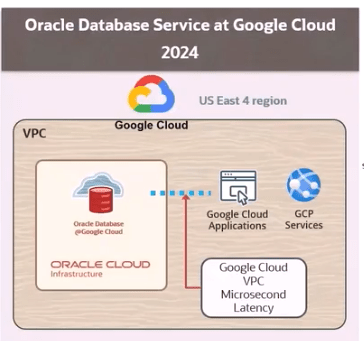
In addition, we’ve launched the Oracle Database at Google Cloud. This places OCI’s Exadata Database Service inside Google Cloud data centers, removing the need for a manual private interconnect. With microsecond latency, this enables native GCP app-to-database performance and seamless integration.
Current regions include:
Four data centers live
Eight more regions planned
Support for this service is jointly managed by Oracle and Google Cloud, offering end-to-end issue resolution via either support team.
🚀 OCI + AWS: A New Frontier
Another major announcement from CloudWorld: Oracle Database at AWS. OCI’s Exadata Database Service is now available in AWS data centers, offering native OCI capabilities with seamless AWS integration.
Key highlights:
No private interconnect setup required
Native performance and microsecond latency
Joint support by Oracle and AWS
Preview rollout in late 2024, with general availability expanding in 2025
This brings the full power of Oracle Exadata to customers operating primarily in AWS environments.
📊 OCI Cloud Migrations: AWS to Oracle Made Easy
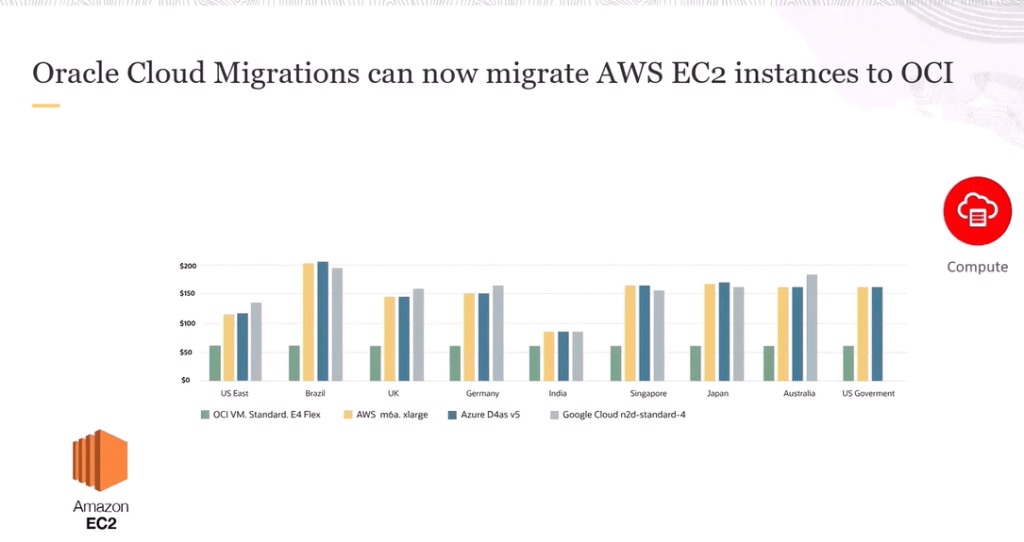
We’ve also launched an OCI Cloud Migrations tool, now capable of migrating AWS EC2 instances to Oracle Cloud Infrastructure. It auto-discovers EC2 resources, builds an OCI-based inventory, and provides:
Compatibility assessments
Metrics-based recommendations
Cost comparisons with competing cloud platforms
The result? Easier migration, better pricing, and the same high-performance Oracle experience.
🔄 Consistent Pricing, Superior Performance
Oracle continues to lead with consistent pricing across regions and industry-best performance metrics. Whether you’re comparing against Azure, GCP, or AWS, OCI often delivers the most cost-effective and high-performing option.
📅 What’s Next?
More integrated regions with Google Cloud and AWS
Broader availability of Oracle Database in AWS
Deeper automation and cost tools for multicloud workloads
Azure AI Services is a collection of services that are building blocks of AI functionality you can integrate into your applications. In this learning path, you’ll learn how to provision, secure, monitor, and deploy Azure AI Services resources and use them to build intelligent solutions.
Introduction
The growth in the use of artificial intelligence (AI) in general, and generative AI in particular means that developers are increasingly required to create comprehensive AI solutions. These solutions need to combine machine learning models, AI services, prompt engineering solutions, and custom code.
Microsoft Azure provides multiple services that you can use to create AI solutions. However, before embarking on an AI application development project, it’s useful to consider the available options for services, tools, and frameworks as well as some principles and practices that can help you succeed.
This module explores some of the key considerations for planning an AI development project, and introduces Azure AI Foundry; a comprehensive platform for AI development on Microsoft Azure.
What is AI?
The term “Artificial Intelligence” (AI) covers a wide range of software capabilities that enable applications to exhibit human-like behavior. AI has been around for many years, and its definition has varied as the technology and use cases associated with it have evolved. In today’s technological landscape, AI solutions are built on machine learning models that encapsulate semantic relationships found in huge quantities of data; enabling applications to appear to interpret input in various formats, reason over the input data, and generate appropriate responses and predictions.
Common AI capabilities that developers can integrate into a software application include:
Capability Description
Description
Generative AI
The ability to generate original responses to natural language prompts. For example, software for a real estate business might be used to automatically generate property descriptions and advertising copy for a property listing
Agents
Generative AI applications that can respond to user input or assess situations autonomously, and take appropriate actions. For example, an “executive assistant” agent could provide details about the location of a meeting on your calendar, or even attach a map or automate the booking of a taxi or rideshare service to help you get there.
Computer vision
The ability to accept, interpret, and process visual input from images, videos, and live camera streams. For example, an automated checkout in a grocery store might use computer vision to identify which products a customer has in their shopping basket, eliminating the need to scan a barcode or manually enter the product and quantity.
Speech
The ability to recognize and synthesize speech. For example, a digital assistant might enable users to ask questions or provide audible instructions by speaking into a microphone, and generate spoken output to provide answers or confirmations.
Natural language processing
The ability to process natural language in written or spoken form, analyze it, identify key points, and generate summaries or categorizations. For example, a marketing application might analyze social media messages that mention a particular company, translate them to a specific language, and categorize them as positive or negative based on sentiment analysis.
Information extraction
The ability to use computer vision, speech, and natural language processing to extract key information from documents, forms, images, recordings, and other kinds of content. For example, an automated expense claims processing application might extract purchase dates, individual line item details, and total costs from a scanned receipt.
Decision support
The ability to use historic data and learned correlations to make predictions that support business decision making. For example, analyzing demographic and economic factors in a city to predict real estate market trends that inform property pricing decisions.
Determining the specific AI capabilities you want to include in your application can help you identify the most appropriate AI services that you’ll need to provision, configure, and use in your solution.
A closer look at generative AI
Generative AI represents the latest advance in artificial intelligence, and deserves some extra attention. Generative AI uses language models to respond to natural language prompts, enabling you to build conversational apps and agents that support research, content creation, and task automation in ways that were previously unimaginable.
The language models used in generative AI solutions can be large language models (LLMs) that have been trained on huge volumes of data and include many millions of parameters; or they can be small language models (SLMs) that are optimized for specific scenarios with lower overhead. Language models commonly respond to text-based prompts with natural language text; though increasingly new multi-modal models are able to handle image or speech prompts and respond by generating text, code, speech, or images.
Azure AI services
Microsoft Azure provides a wide range of cloud services that you can use to develop, deploy, and manage an AI solution. The most obvious starting point for considering AI development on Azure is Azure AI services; a set of out-of-the-box prebuilt APIs and models that you can integrate into your applications. The following table lists some commonly used Azure AI services.
Service
Description
Azure OpenAI
Azure OpenAI in Foundry Models provides access to OpenAI generative AI models including the GPT family of large and small language models and DALL-E image-generation models within a scalable and securable cloud service on Azure.
Azure AI Vision
The Azure AI Vision service provides a set of models and APIs that you can use to implement common computer vision functionality in an application. With the AI Vision service, you can detect common objects in images, generate captions, descriptions, and tags based on image contents, and read text in images.
Azure AI Speech
The Azure AI Speech service provides APIs that you can use to implement text to speech and speech to text transformation, as well as specialized speech-based capabilities like speaker recognition and translation.
Azure AI Language
The Azure AI Language service provides models and APIs that you can use to analyze natural language text and perform tasks such as entity extraction, sentiment analysis, and summarization. The AI Language service also provides functionality to help you build conversational language models and question answering solutions.
Azure AI Foundry Content Safety
Azure AI Foundry Content Safety provides developers with access to advanced algorithms for processing images and text and flagging content that is potentially offensive, risky, or otherwise undesirable.
Azure AI Translator
The Azure AI Translator service uses state-of-the-art language models to translate text between a large number of languages.
Azure AI Face
The Azure AI Face service is a specialist computer vision implementation that can detect, analyze, and recognize human faces. Because of the potential risks associated with personal identification and misuse of this capability, access to some features of the AI Face service are restricted to approved customers.
Azure AI Custom Vision
The Azure AI Custom Vision service enables you to train and use custom computer vision models for image classification and object detection.
Azure AI Document Intelligence
With Azure AI Document Intelligence, you can use pre-built or custom models to extract fields from complex documents such as invoices, receipts, and forms.
Azure AI Content Understanding
The Azure AI Content Understanding service provides multi-modal content analysis capabilities that enable you to build models to extract data from forms and documents, images, videos, and audio streams.
Azure AI Search
The Azure AI Search service uses a pipeline of AI skills based on other Azure AI Services and custom code to extract information from content and create a searchable index. AI Search is commonly used to create vector indexes for data that can then be used to ground prompts submitted to generative AI language models, such as those provided in Azure OpenAI.
Considerations for Azure AI services resources
To use Azure AI services, you create one or more Azure AI resources in an Azure subscription and implement code in client applications to consume them. In some cases, AI services include web-based visual interfaces that you can use to configure and test your resources – for example to train a custom image classification model using the Custom Vision service you can use the visual interface to upload training images, manage training jobs, and deploy the resulting model.
Single service or multi-service resource?
Most Azure AI services, such as Azure AI Vision, Azure AI Language, and so on, can be provisioned as standalone resources, enabling you to create only the Azure resources you specifically need. Additionally, standalone Azure AI services often include a free-tier SKU with limited functionality, enabling you to evaluate and develop with the service at no cost. Each standalone Azure AI resource provides an endpoint and authorization keys that you can use to access it securely from a client application.
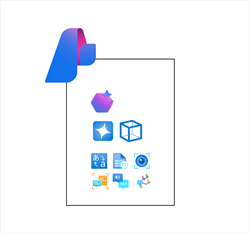
Alternatively, you can provision a multi-service Azure AI services resource that encapsulates the following services in a single Azure resource:
Azure OpenAI
Azure AI Speech
Azure AI Vision
Azure AI Language
Azure AI Foundry Content Safety
Azure AI Translator
Azure AI Document Intelligence
Azure AI Content Understanding
Using a multi-service resource can make it easier to manage applications that use multiple AI capabilities.
Regional availability
Some services and models are available in only a subset of Azure regions. Consider service availability and any regional quota restrictions for your subscription when provisioning Azure AI services. Use the product availability table to check regional availability of Azure services. Use the model availability table in the Azure OpenAI documentation to determine regional availability for Azure OpenAI models.
Cost
Azure AI services are charged based on usage, with different pricing schemes available depending on the specific services being used. As you plan an AI solution on Azure, use the Azure AI services pricing documentation to understand pricing for the AI services you intend to incorporate into your application. You can use the Azure pricing calculator to estimate the costs your expected usage will incur.
Azure AI Foundry
Completed100 XP
5 minutes
Azure AI Foundry is a platform for AI development on Microsoft Azure. While you can provision individual Azure AI services resources and build applications that consume them without it, the project organization, resource management, and AI development capabilities of Azure AI Foundry makes it the recommended way to build all but the most simple solutions.
Azure AI Foundry provides the Azure AI Foundry portal, a web-based visual interface for working with AI projects. It also provides the Azure AI Foundry SDK, which you can use to build AI solutions programmatically.
Azure AI Foundry projects
In Azure AI Foundry, you manage the resource connections, data, code, and other elements of the AI solution in projects. There are two kinds of project:
Foundry projects
Foundry projects are associated with an Azure AI Foundry resource in an Azure subscription. Foundry projects provide support for Azure AI Foundry models (including OpenAI models), Azure AI Foundry Agent Service, Azure AI services, and tools for evaluation and responsible AI development.
An Azure AI Foundry resource supports the most common AI development tasks to develop generative AI chat apps and agents. In most cases, using a Foundry project provides the right level of resource centralization and capabilities with a minimal amount of administrative resource management. You can use Azure AI Foundry portal to work in projects that are based in Azure AI Foundry resources, making it easy to add connected resources and manage model and agent deployments.
Hub-based projects
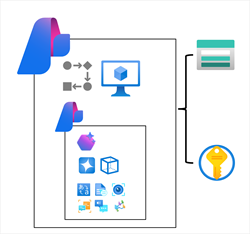
Hub-based projects are associated with an Azure AI hub resource in an Azure subscription. Hub-based projects include an Azure AI Foundry resource, as well as managed compute, support for prompt Flow development, and connected Azure storage and Azure key vault resources for secure data storage.
Azure AI hub resources support advanced AI development scenarios, like developing Prompt Flow based applications or fine-tuning models. You can also use Azure AI hub resources in both Azure AI Foundry portal and Azure Machine learning portal, making it easier to work on collaborative projects that involve data scientists and machine learning specialists as well as developers and AI software engineers.
Developer tools and SDKs
While you can perform many of the tasks needed to develop an AI solution directly in the Azure AI Foundry portal, developers also need to write, test, and deploy code.
Development tools and environments
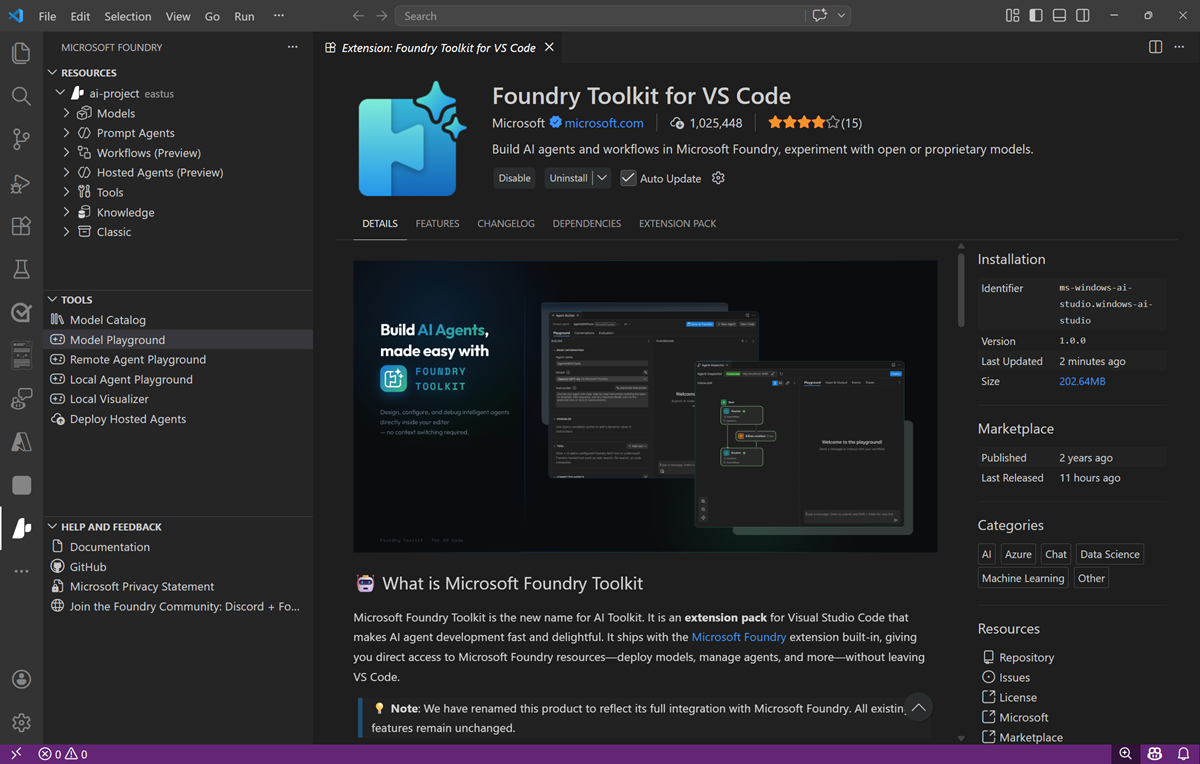
There are many development tools and environments available, and developers should choose one that supports the languages, SDKs, and APIs they need to work with and with which they’re most comfortable. For example, a developer who focuses strongly on building applications for Windows using the .NET Framework might prefer to work in an integrated development environment (IDE) like Microsoft Visual Studio. Conversely, a web application developer who works with a wide range of open-source languages and libraries might prefer to use a code editor like Visual Studio Code (VS Code). Both of these products are suitable for developing AI applications on Azure.
The Azure AI Foundry VS Code container image
As an alternative to installing and configuring your own development environment, when working in a hub-based project in Azure AI Foundry portal, you can create compute and use it to host a container image for VS Code (installed locally or as a hosted web application in a browser). The benefit of using the container image is that it includes the latest versions of the SDK packages you’re most likely to work with when building AI applications with Azure AI Foundry.
When planning to use the VS Code container image in Azure AI Foundry, consider the cost of the compute required to host it and the quota you have available to support developers using it.
GitHub and GitHub Copilot
GitHub is the world’s most popular platform for source control and DevOps management, and can be a critical element of any team development effort. Visual Studio and VS Code (including the Azure AI Foundry VS Code container image) both provide native integration with GitHub, and access to GitHub Copilot; an AI assistant that can significantly improve developer productivity and effectiveness.
Programming languages, APIs, and SDKs
You can develop AI applications using many common programming languages and frameworks, including Microsoft C#, Python, Node, TypeScript, Java, and others. When building AI solutions on Azure, some common SDKs you should plan to install and use include:
The Azure AI Foundry SDK, which enables you to write code to connect to Azure AI Foundry projects and access resource connections, which you can then work with using service-specific SDKs.
Azure AI Services SDKs – AI service-specific libraries for multiple programming languages and frameworks that enable you to consume Azure AI Services resources in your subscription. You can also use Azure AI Services through their REST APIs.
The Prompt Flow SDK, which you can use to implement orchestration logic to manage prompt interactions with generative AI models.
Responsible AI
It’s important for software engineers to consider the impact of their software on users, and society in general; including considerations for its responsible use. When the application is imbued with artificial intelligence, these considerations are particularly important due to the nature of how AI systems work and inform decisions; often based on probabilistic models, which are in turn dependent on the data with which they were trained.
The human-like nature of AI solutions is a significant benefit in making applications user-friendly, but it can also lead users to place a great deal of trust in the application’s ability to make correct decisions. The potential for harm to individuals or groups through incorrect predictions or misuse of AI capabilities is a major concern, and software engineers building AI-enabled solutions should apply due consideration to mitigate risks and ensure fairness, reliability, and adequate protection from harm or discrimination.
Let’s discuss some core principles for responsible AI that have been adopted at Microsoft.
Fairness
AI systems should treat all people fairly. For example, suppose you create a machine learning model to support a loan approval application for a bank. The model should make predictions of whether or not the loan should be approved without incorporating any bias based on gender, ethnicity, or other factors that might result in an unfair advantage or disadvantage to specific groups of applicants.
Fairness of machine learned systems is a highly active area of ongoing research, and some software solutions exist for evaluating, quantifying, and mitigating unfairness in machine learned models. However, tooling alone isn’t sufficient to ensure fairness. Consider fairness from the beginning of the application development process; carefully reviewing training data to ensure it’s representative of all potentially affected subjects, and evaluating predictive performance for subsections of your user population throughout the development lifecycle.
Reliability and safety
AI systems should perform reliably and safely. For example, consider an AI-based software system for an autonomous vehicle; or a machine learning model that diagnoses patient symptoms and recommends prescriptions. Unreliability in these kinds of system can result in substantial risk to human life.
As with any software, AI-based software application development must be subjected to rigorous testing and deployment management processes to ensure that they work as expected before release. Additionally, software engineers need to take into account the probabilistic nature of machine learning models, and apply appropriate thresholds when evaluating confidence scores for predictions.
Privacy and security
AI systems should be secure and respect privacy. The machine learning models on which AI systems are based rely on large volumes of data, which may contain personal details that must be kept private. Even after models are trained and the system is in production, they use new data to make predictions or take action that may be subject to privacy or security concerns; so appropriate safeguards to protect data and customer content must be implemented.
Inclusiveness
AI systems should empower everyone and engage people. AI should bring benefits to all parts of society, regardless of physical ability, gender, sexual orientation, ethnicity, or other factors.
One way to optimize for inclusiveness is to ensure that the design, development, and testing of your application includes input from as diverse a group of people as possible.
Transparency
AI systems should be understandable. Users should be made fully aware of the purpose of the system, how it works, and what limitations may be expected.
For example, when an AI system is based on a machine learning model, you should generally make users aware of factors that may affect the accuracy of its predictions, such as the number of cases used to train the model, or the specific features that have the most influence over its predictions. You should also share information about the confidence score for predictions.
When an AI application relies on personal data, such as a facial recognition system that takes images of people to recognize them; you should make it clear to the user how their data is used and retained, and who has access to it.
Accountability
People should be accountable for AI systems. Although many AI systems seem to operate autonomously, ultimately it’s the responsibility of the developers who trained and validated the models they use, and defined the logic that bases decisions on model predictions to ensure that the overall system meets responsibility requirements. To help meet this goal, designers and developers of AI-based solution should work within a framework of governance and organizational principles that ensure the solution meets responsible and legal standards that are clearly defined.
Exercise – Prepare for an AI development project
If you have an Azure subscription, you can explore Azure AI Foundry for yourself.
Note
If you don’t have an Azure subscription, and you want to explore Azure AI Foundry, you can sign up for an account, which includes credits for the first 30 days.
Launch the exercise and follow the instructions.
In this module, you explored some of the key considerations when planning and preparing for AI application development. You’ve also had the opportunity to become familiar with Azure AI Foundry, the recommended platform for developing AI solutions on Azure.
In today’s microservices-driven world, API management plays a crucial role in ensuring scalability, security, and performance. Kong API Gateway is a leading open-source and enterprise-grade API management solution designed for high availability, extensibility, and ease of use. This blog post outlines a sample Kong API technical architecture, showcasing how it can be deployed to effectively manage APIs in a cloud-native environment.
Core Components of Kong API Gateway Architecture
A typical Kong API Gateway architecture consists of the following components:
1. Kong Gateway
Acts as the entry point for API requests.
Handles routing, authentication, rate limiting, logging, and other functionalities.
Supports custom plugins written in Lua and Go to extend capabilities.
Deployable as a containerized service using Docker or Kubernetes.
2. Database Layer (PostgreSQL or DB-less Mode)
Stores API configuration, routing rules, consumer credentials, etc.
Supports a DB-less mode for lightweight, fast API gateway deployments.
3. Upstream Services (Microservices & APIs)
API endpoints hosted in Kubernetes pods, AWS Lambda, or on-prem servers.
Managed and secured via Kong policies and plugins.
4. Identity & Security Layer
Supports OAuth2, JWT, mTLS, and API key authentication.
Integrates with identity providers such as Keycloak, Okta, and Auth0.
Implements traffic encryption with TLS/SSL.
5. Observability & Monitoring
Integrates with Prometheus, Grafana, ELK Stack, Datadog for monitoring.
Infrastructure as Code (IaC) using Terraform and Helm.
Blue-Green & Canary deployments for seamless updates.
Sample Kong API Gateway Deployment Architecture
Below is a simplified deployment architecture of Kong API Gateway in a Kubernetes-based environment.
                +--------------------------+
                |      API Clients         |
                +--------------------------+
                           |
                           ▼
                +--------------------------+
                |  Kong API Gateway (Ingress) |
                +--------------------------+
                 |        |         |
                 ▼        ▼         ▼
          +-----------+  +-----------+  +-----------+
          | Service A |  | Service B |  | Service C |
          +-----------+  +-----------+  +-----------+
                 |        |         |
                 ▼        ▼         ▼
          +----------------------------------+
          | Database / Storage / External APIs |
          +----------------------------------+
Kong API Gateway acts as the API ingress, managing security and traffic.
Upstream microservices communicate through service discovery.
Authentication, rate limiting, logging, and monitoring are managed via Kong plugins.
Key Features & Benefits
1. Scalability
Horizontal scaling using Kubernetes and Docker Swarm.
Load balancing and failover mechanisms.
2. High Availability & Fault Tolerance
Supports multi-region deployments.
Automated failover with HAProxy, Nginx, or cloud-native load balancers.
3. Security
Implements zero-trust architecture with fine-grained access control.
API encryption via TLS/SSL termination.
4. Performance Optimization
API caching to reduce latency.
Request transformation and compression to optimize API payloads.
Conclusion
Kong API Gateway provides a robust, scalable, and secure API management solution for modern microservices architectures. By integrating Kong with security, observability, and DevOps tools, organizations can enhance API governance, optimize performance, and ensure seamless scalability.
Would you like a hands-on tutorial on setting up Kong API Gateway? Let me know in the comments!




















 Tech Group
Leave a comment